Word Garden : Crosswords
- 4.9
- Rating
- 10.00M
- Installs
- Free
- Price
 Analysis by App-foxy
I spent time with Word Garden: Crosswords as a casual word game, and its appeal is easy to understand: it turns anagrams into compact crossword-style puzzles that are simple to start but can become surprisingly stubborn. It is free to download and play, so the first question is not whether you must pay to enter, but whether the relaxed puzzle loop is worth keeping on your phone. In my experience, it works best as a short-session game for people who enjoy rearranging letters, spotting familiar words, and making gradual progress without needing a complex rulebook.
The game comes from IsCool Entertainment and sits firmly in the word-puzzle category. Its age rating is Everyone, which matches the clean, language-focused nature of the experience. It has been available since February 14, 2018, and the current version is 3.16.0. That long presence and its 10M+ installs suggest that the format has found a broad audience, while the 4.9 average from around 488 thousand ratings shows that many players respond very positively to it.
How the puzzle loop feels in everyday play
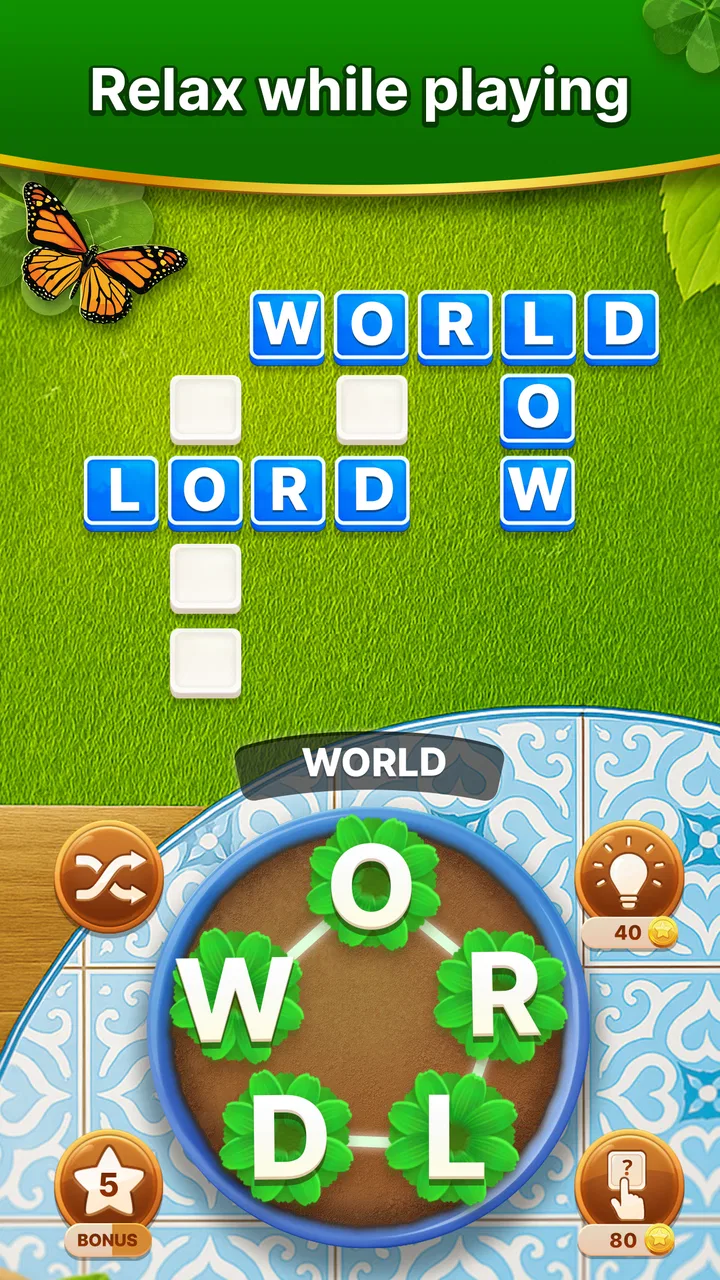
The central idea is familiar: you receive a group of letters and form words from them, with the answers fitting into a small crossword-like arrangement. What makes the format pleasant is the combination of freedom and direction. You are not simply solving a clue with one answer in isolation; each word helps reveal the shape of the wider puzzle. A word that seems unimportant can provide the missing letters or structure needed to finish the board.
You May Also Like

 Pandora - Music & Podcasts
Pandora’s Music Is Easy to Start, but Harder to Recover
Pandora’s strength is its low-effort path from a seed to a station. Its weak spot is how much confidence it asks you to place in connection, setup, and quiet recovery.

 8 Ball Pool
 Is Built on Rivalries, Rematches, and Routine
A close look at the rivalries, rematches, shared routines, and unanswered safety questions that turn a quick pool match into a persistent mobile community.

 Samsung Music
’s Quiet Strength Is Playing What You Already Own
Its reach comes less from spectacle than from dependable access to a personal library. That simplicity is both the app’s strongest retention engine and its ceiling.

 AccuWeather: Weather Radar
AccuWeather Review: A Quick, Clear Forecast for Everyday Decisions
For everyday plans, the best forecast is the one you can understand quickly. AccuWeather makes rain timing, radar, and local conditions easy to act on, with a few trade-offs.

 Hill Climb Racing
Why Hill Climb Racing Still Turns Crashes Into One More Run
A tiny car, a bumpy hill and one more upgrade: Hill Climb Racing keeps resurfacing because its simple chaos makes every near-miss feel personal.

 AliExpress - Shopping App
AliExpress Makes Global Shopping Feel Personal, but Shoppers Bear the Risk
AliExpress turns a global marketplace into a pocket-sized discovery engine. Its reach is useful, its shopping loop compelling, and its trade-offs easy to miss.
More From Our News Desk
View All News


I found that this creates a useful rhythm. At the beginning of a puzzle, I usually entered the obvious words first. That gave me a clearer view of the remaining spaces and reduced the number of possible combinations. Instead of staring at a scrambled group of letters and trying to invent something from nothing, I could use the partially completed board as a guide. This is one of the strongest design choices in the game because every correct answer changes the next decision.
The result is more thoughtful than a basic anagram list, but less demanding than a traditional newspaper crossword with long clues and cultural references. You can play by instinct, or you can slow down and examine letter patterns. That makes it suitable for a quick break, yet it still offers enough resistance to keep a puzzle from feeling completely automatic.
A realistic use case is a short wait at a station or a few quiet minutes before bed. I would open a puzzle, find several easy words, then leave the harder section for later rather than forcing it. The game is especially comfortable in that situation because progress does not require a long uninterrupted session. It also avoids the pressure of competing against another player, which may appeal to anyone who wants a calm mental exercise rather than a performance test.
Why the crossword arrangement matters
The crossword layout gives the anagram mechanic a practical purpose. In a plain word scramble, finding one valid word may feel disconnected from the next. Here, the crossing letters provide feedback. If a candidate word does not fit with the letters already revealed, I can discard it quickly. If it does fit, the placement can unlock a new route through the puzzle.
That makes the game a good choice for players who enjoy deduction but do not necessarily want formal clues. It also creates a small tactical decision: should I chase a word that seems likely, or use the known letters to narrow down a more difficult section? I often found that the second approach was better. Filling the board methodically is more reliable than repeatedly trying random combinations.
One non-obvious benefit is that the board itself teaches you how to improve. After a few puzzles, I became more aware of common word endings, short connecting words, and ways a single letter can change the available options. The game does not need to explain every lesson directly; the crossing structure makes those patterns visible through repetition.
What makes it different from familiar alternatives
Compared with a standard crossword app, this game puts less emphasis on general knowledge, cryptic wording, or trivia. If you dislike clues that depend on obscure names or specialist subjects, the anagram approach may feel more approachable. You mainly work with letters and placement, so the challenge is closer to vocabulary recognition and pattern solving.
Compared with a basic anagram game, however, it gives your discoveries more context. You are not merely checking whether a word exists. You are building a connected result, and the board helps you decide what to try next. That extra layer makes it more satisfying than endlessly submitting isolated guesses.
The trade-off is that players who love rich clues may find the experience too direct. Traditional crosswords can surprise you with wordplay, humor, or a clever definition. Word Garden: Crosswords is better suited to someone who wants a visual, letter-based challenge. If your favorite word games depend on deep vocabulary knowledge or elaborate clue interpretation, another format may provide more variety.
Cost, free access, and the value of continuing
The game is free, which makes trying it straightforward. You do not need to commit money before discovering whether the anagram-crossword combination suits you. That matters here because the main value is highly personal: some players will enjoy the steady routine for a long time, while others may decide after a few sessions that they want more demanding clues or a faster pace.
There are in-app purchases priced from $1.49 to $64.99 per item. I would treat those purchases as optional spending rather than part of the basic entry cost. The sensible approach is to play the free version first, decide whether the puzzle flow genuinely fits your habits, and only then consider whether any paid option solves a problem you actually have. A purchase is easier to justify when it supports a game you return to regularly, not when it is made simply because a difficult puzzle has interrupted your momentum.
This distinction is important for judging value. The free access gives you a low-risk way to test the core experience, but the existence of purchases means I would not describe the entire long-term experience as cost-free without qualification. Before spending, I would also check the purchase screen carefully and make sure the item offers something useful for the way I play. The prices cover a wide range, so assuming every option has the same value would be a mistake.
For me, the strongest value comes from the repeatable format rather than from any single puzzle. A short word game earns its place on a phone when it is easy to resume, offers a clear goal, and does not require a large time investment. This one meets that standard for casual play. Its value is weaker for someone looking for a complete, one-time puzzle collection with a fixed endpoint or a premium experience with no optional spending layer.
Small habits that improve solving
My most useful tactic was to avoid treating every possible word as equally important. I started with the longest or most obvious combinations, then used the letters exposed by the crossings to guide the smaller entries. This reduced wasted guesses and made the board feel less crowded.
A second useful habit is to pause when only one or two spaces remain. At that point, repeatedly cycling through the same familiar words is rarely productive. I found it better to inspect the exact letter pattern, consider alternate endings, and look for a short word that I might normally overlook. The final gap often becomes easier when I stop thinking about the whole letter group and focus on the shape already created by the board.
A third trade-off involves using help, if the available game flow offers it. Assistance can keep a session enjoyable when I am genuinely stuck, but relying on it too early removes the satisfying deduction that gives the format its identity. I would reserve help for a puzzle that has stopped being relaxing, rather than using it immediately after encountering an unfamiliar arrangement.
These habits also show who may struggle with the game. Players who dislike experimenting with spelling or who become frustrated when a familiar word is not the intended answer may find the repetition tiring. The game rewards patience more than speed. It is not the right choice if you want constant novelty, dramatic progression, or a competitive leaderboard-driven challenge.
Who will get the most from it
I would recommend it first to casual word-game players who like anagrams but want more structure than a simple scramble. It is also a good fit for someone who enjoys quiet solo play and prefers puzzles that can be started and stopped easily. The Everyone rating makes it broadly accessible, although individual enjoyment will still depend on vocabulary comfort and tolerance for repeated letter patterns.
It can work well as a shared activity too, even though the solving itself is individual. Two people can look at the same board and suggest possibilities, taking turns spotting words or debating which entry belongs in a particular space. That makes it more social than its solitary format might suggest, especially for families who want a low-pressure word activity without complicated controls.
People who are learning to approach English word puzzles may also appreciate the visual feedback from the crossings. The board shows how letter placement affects the rest of the solution, which is more instructive than a game that simply marks a word right or wrong. Still, I would not treat it as a formal language-learning tool. Its purpose is entertainment, and the vocabulary may sometimes feel familiar, repetitive, or dependent on knowing accepted word forms.
I would skip it if your priority is a fully clue-driven crossword experience. I would also look elsewhere if you need an offline-first tool, a strictly premium purchase, or a game centered on multiplayer competition; those are not the reasons I would choose this title. Likewise, players who want a constantly changing set of mechanics may find the core anagram-and-grid loop too consistent.
Device expectations and practical considerations
The minimum operating system is Android 7.0, so owners of older Android devices should check compatibility before planning to install it. For supported users, the game’s compact puzzle format is naturally suited to phone play. I prefer it in portrait-oriented, one-handed situations, such as a short break or a commute, because the individual decisions are small and the board can be examined without setting aside a large block of time.
The current version, 3.16.0, is the one I would look for when installing or updating. Keeping the game current is sensible for compatibility and general stability, but I would not choose it solely because of the version number. The important question is whether the underlying style matches your expectations: relaxed anagram solving connected by a crossword layout.
The large review base is reassuring when considered alongside personal testing, but popularity should not override fit. A 4.9 average from around 488 thousand ratings is impressive, and the game has passed the 10M+ installs mark, yet a highly rated casual puzzle can still feel repetitive to someone who wants elaborate clues. I see those figures as evidence of broad appeal, not a guarantee that every word-game fan will prefer it.
My buy-or-skip verdict
I would start with the free version. That is the clearest value decision because it lets you test the exact part that matters: whether forming anagrams inside a connected board remains enjoyable after the initial novelty fades. If you like solving a few entries, using the crossings to narrow possibilities, and returning later without pressure, the game earns a place as a dependable casual puzzle.
I would consider an in-app purchase only after establishing a regular habit and understanding what the specific item changes for me. The available purchase range begins at $1.49 and reaches $64.99 per item, so careful judgment matters. Free access is enough to evaluate the core loop; paid spending should be based on continued personal use, not on the assumption that a larger price automatically means a better experience.
My final recommendation is positive but selective. Word Garden: Crosswords is a strong pick for relaxed anagram fans, occasional crossword players, and anyone who wants a word challenge that fits into small gaps in the day. Its best quality is the way each answer helps shape the next move, giving simple letter rearrangement a satisfying sense of progress.
I would skip it if you need cryptic clues, competitive multiplayer, or a clearly premium, purchase-once structure. For everyone else, the free starting point makes the decision easy: try the puzzles, notice whether the repeated format feels calming or monotonous, and judge the optional spending only after the game has proved that you will return to it. In my experience, that is where its real value becomes clear.
FAQs for Word Garden : Crosswords
01What is Word Garden: Crosswords and how does it work?
Word Garden: Crosswords is an engaging puzzle game that combines the challenge of crosswords with the fun of word searches. Players are tasked with connecting letters in a grid to form words and solve crossword puzzles. It's designed to enhance vocabulary and cognitive skills while providing hours of entertainment.
02Is Word Garden: Crosswords free to play, or does it require in-app purchases?
Word Garden: Crosswords is free to download and play, offering a variety of puzzles at no cost. However, the game includes optional in-app purchases for hints and other enhancements. These purchases can help players progress more quickly or overcome particularly challenging levels.
03What are the system requirements for installing Word Garden: Crosswords on Android and iOS?
For Android devices, Word Garden: Crosswords requires Android version 5.0 or higher. For iOS, the app is compatible with iOS 10.0 or later. Ensure your device meets these requirements for optimal performance and a smooth gaming experience.
04Can Word Garden: Crosswords be played offline?
Yes, Word Garden: Crosswords can be played offline, making it a convenient option for on-the-go gaming. Players can enjoy solving puzzles without an internet connection, although some features like in-app purchases and updates require online access.
05How does Word Garden: Crosswords keep gameplay interesting and challenging?
Word Garden: Crosswords offers a variety of puzzles with increasing difficulty levels to keep players engaged. The game introduces new themes and special challenges regularly. Additionally, daily puzzles and events provide fresh content for players to enjoy, ensuring a dynamic and evolving experience.
Pros
- Challenging puzzles keep gameplay engaging.
- Visually appealing with vibrant graphics.
- Improves vocabulary and word skills.
- Regular updates with new levels.
- Works offline
- perfect for travel.
Cons
- Ads can interrupt the gaming experience.
- Some levels feel repetitively similar.
- In-app purchases can be pricey.
- Occasional bugs cause game to freeze.
- Limited hints can be frustrating.

Word Garden : Crosswords
Gallery